Precautions When Using Family Payments or Shared Devices on Adult Content Platforms
Using an adult content platform through a family payment method or shared device can create several records outside the platform itself. The purchase may appear in a banking application, an email receipt may reach a shared inbox, a saved password may synchronize to another computer, or the account may remain accessible after the browser window is closed.
Private browsing addresses only a small part of this problem. It does not remove a payment from the cardholder’s statement, cancel a subscription, delete a receipt, prevent account synchronization, or stop another person from reopening an active session. The safer approach is to examine the entire setup before subscribing: payment ownership, renewal terms, account access, device controls, browser profiles, notifications, and the possibility that a minor could reach the account.
The lowest-risk arrangement is a personally controlled payment method, email address, device, browser profile, password, and recovery channel used by one legally eligible adult. When any of those elements are shared, the user should assume that the activity may become visible and decide whether the remaining exposure is acceptable.
A Family Payment Method Creates a Permanent Financial Record
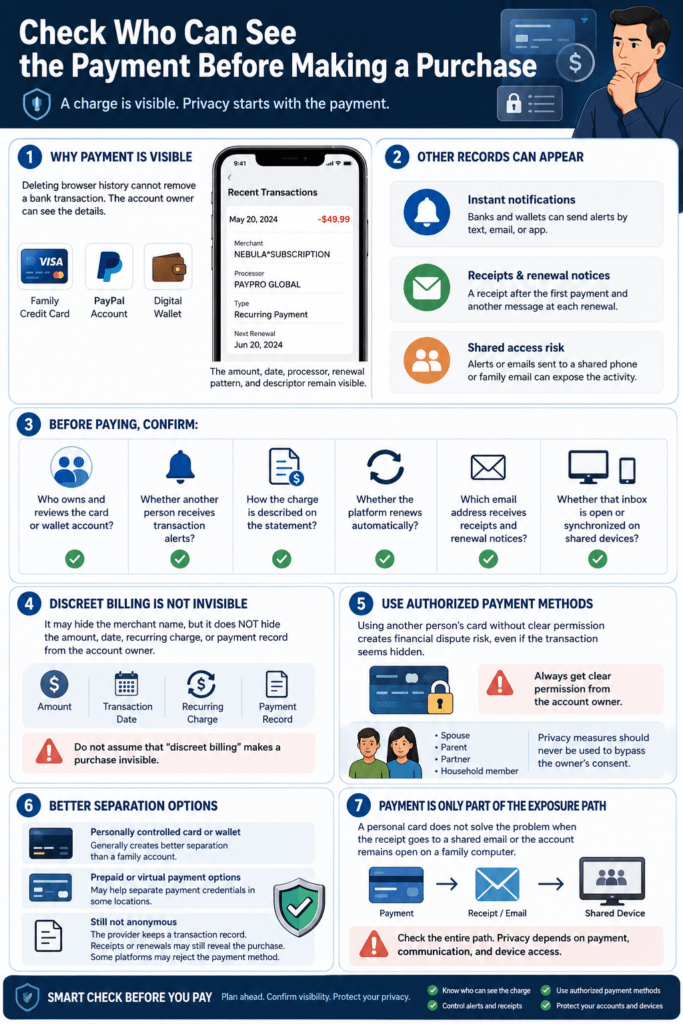
The first privacy check should take place before payment. Browser history can be cleared, but a completed transaction normally remains in the records of the card issuer, bank, wallet provider, payment processor, and merchant.
A card statement may not display the same brand name shown on the website. Payment systems use statement descriptors to identify charges, and the visible text may contain the merchant name, a shortened business name, or information associated with the payment processor. Stripe, for example, explains that statement descriptors are used to help customers recognize charges on their bank statements. The exact wording depends on the merchant’s payment setup, card network rules, and financial institution.
A neutral descriptor should not be mistaken for invisibility. The account owner may still see the amount, transaction date, currency, payment type, and whether similar charges recur. Some payment methods may show the processor followed by the merchant name; Stripe’s PayPal documentation, for example, describes a statement format that can include PAYPAL and the business name.
Receipts create another exposure path. Payment processors can generate receipts for successful payments, refunds, invoices, and subscription charges, and merchants may automatically send those receipts to the email address provided at checkout. A shared inbox or an email account synchronized to a family tablet can therefore reveal the purchase even when nobody reviews the complete card statement.
Before using a family card, shared wallet, or joint bank account, establish who owns the payment method and who receives alerts. Review the descriptor shown by the platform, but do not rely on it as a privacy guarantee. Also confirm where receipts, failed-payment notices, refund messages, and renewal reminders will be delivered.
The payment must be authorized by its owner. Privacy settings should never be used to conceal an unauthorized charge from a spouse, parent, partner, employer, or other cardholder. A disputed family transaction can lead to account suspension, chargebacks, or a financial conflict regardless of the nature of the purchase.
A personally controlled payment method offers better separation, but it does not make the transaction anonymous. The bank and payment provider still retain records, and the purchase may remain visible through app notifications, statements, tax records, or account history.
The Basic Subscription May Not Be the Final Cost
The amount shown on the first subscription screen may represent only one part of the platform’s pricing structure. Depending on the service, additional spending can involve individual content purchases, private messages, creator tips, premium tiers, paid live events, or optional upgrades.
Before confirming payment, identify whether the charge is one-time or recurring. Look for the billing interval, introductory period, renewal price, next billing date, cancellation process, and any separate features that can create additional charges.
Automatic renewal deserves special attention on a shared payment method. A first charge may be noticed immediately, but a later renewal can appear months afterward, when the user no longer remembers the original purchase. The FTC advises consumers to review renewal notices, confirm that the price matches what they expected, and examine the cancellation policy before the next charge occurs. Promotional rates may also change when the subscription renews.
Record the next renewal date outside the platform, preferably in a private calendar controlled by the subscriber. Do not depend only on an email reminder, since that message may be sent to a shared address or filtered into spam.
After subscribing, open the billing or subscription-management page and confirm the active plan. Review whether automatic renewal is enabled, which payment method is stored, and whether cancellation takes effect immediately or at the end of the current billing period. Save the cancellation confirmation and continue checking the account statement afterward. The FTC recommends retaining proof of a cancellation request and monitoring for charges that continue after cancellation.
Removing a saved card is not always the same as canceling a subscription. A platform may continue using the payment authorization connected to the active plan, or it may request another payment method before allowing removal. Cancel through the official subscription page and verify the resulting status.
Extra purchases should be reviewed separately from membership renewal. A user may cancel the base subscription while one-time purchases remain on the account history. Conversely, disabling individual purchases may not stop a recurring membership.
A complete cost review should answer four questions: what is being purchased now, what can be charged later, which actions trigger additional spending, and where the next charge date is recorded.
Shared Devices Preserve More Than Browser History
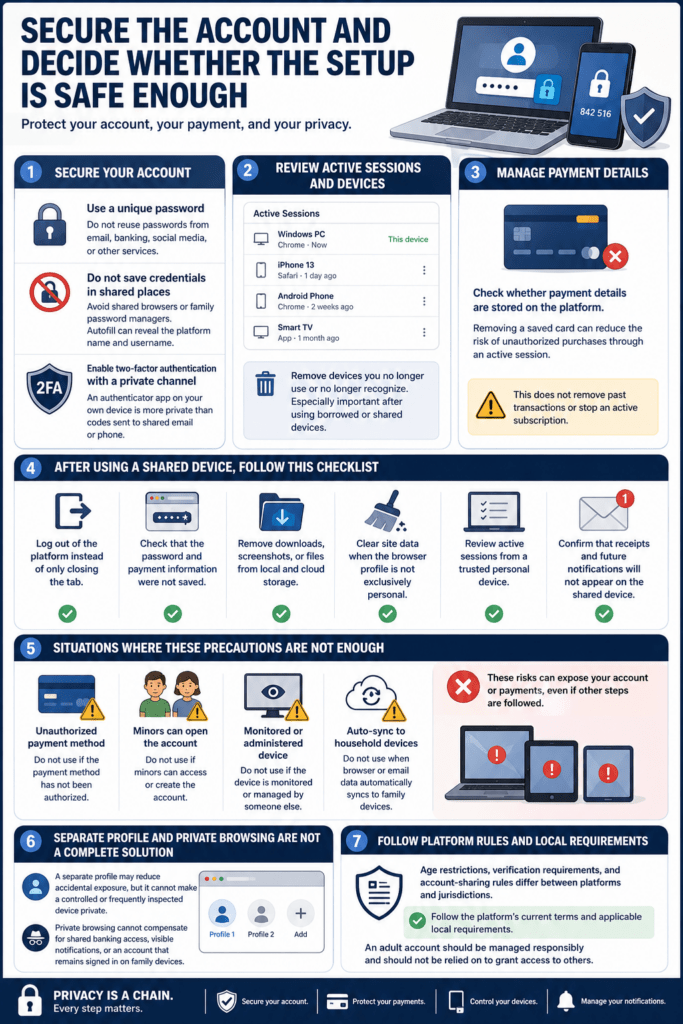
A family computer, tablet, smart television, or phone can expose activity through open sessions, autofill, saved passwords, notifications, recent applications, downloads, and synchronized browser data.
Private or Incognito mode offers limited local separation. Chrome states that Incognito prevents certain activity from being saved on the device after the session ends, but it does not make the user invisible. Websites and organizations managing the network, such as an employer, school, or internet provider, may still observe activity.
It also does not protect information deliberately created during the session. A downloaded file remains on the device. A payment remains on the financial account. An email receipt remains in the inbox. A screenshot remains in local or cloud storage. Logging into the platform may create an account-side history even if the browser does not retain the visited page locally.
Saved passwords and browser synchronization create a different risk. Chrome can make bookmarks, passwords, history, open tabs, addresses, payment methods, settings, and other data available across devices signed into the same Google account, depending on the synchronization configuration.
A password saved on one shared computer may therefore become available through the same browser account elsewhere. Autofill can also expose the platform name or login address before anyone opens the site.
A separate browser profile offers stronger separation than repeatedly clearing one shared profile. Google states that Chrome profiles keep bookmarks, history, passwords, and other settings separate, making them suitable for computers used by several people. However, signing that profile into a shared Google account can allow its information to become accessible on other signed-in devices.
A separate operating-system account is better when the device supports one. It can isolate browser data, downloads, notifications, and application sessions from other household users. The account should have its own password, and another person should not have administrator access that allows them to inspect its files.
After using any shared device, log out through the platform’s account menu rather than closing the tab. Verify that the password was not saved, remove unexpected downloads, close private tabs, clear site data where appropriate, and check whether the platform lists the device as an active session.
Account-security pages can help locate devices that still have access. Google, for example, lets users review devices and sessions connected to their account and sign out those they no longer recognize or control. Adult-content platforms may offer a similar section under security, sessions, login history, or recognized devices.
Viewing History and Recommendations Need Their Own Separation
Even when the payment method is private, a shared platform account can expose searches, viewed content, followed creators, saved items, downloads, and recommendations.
Recommendation systems often react to account activity rather than the physical person holding the device. When several household members use the same login, one user’s viewing can influence what appears on the home screen for everyone else. Removing the browser history does not necessarily remove history stored by the platform.
Use a separate personal account rather than a family login. Do not connect it to a shared email address or recovery phone when privacy from other adults in the household is important. A shared recovery channel can reveal account alerts, login codes, password-reset messages, and the platform’s identity.
The same separation should apply to the browser. Using a personal platform account inside the family’s everyday browser profile can still expose autofill entries, cookies, bookmarks, and recent tabs. A dedicated browser profile or personally controlled device reduces the likelihood that platform activity will be mixed with household browsing data.
This issue becomes more important on smart televisions and shared tablets, where applications may display recently watched content or personalized suggestions as soon as they open. Treat the account as accessible until you have confirmed that it is fully signed out or removed from the device.
Users comparing the membership fee with optional purchases should also review Analyzing Adult Content Pricing Structures With Repeated Charges Beyond the Basic Subscription. Separating subscription costs from tips, messages, premium access, and one-time content makes unexpected billing easier to identify.
Notifications require their own review. Disable sensitive previews on the lock screen, confirm which email account receives platform messages, and check whether browser or application notifications are synchronized to other devices. Muting one notification type may not stop receipts or security alerts sent through another channel.
Downloads and screenshots should not be stored in shared photo libraries, cloud drives, or automatic backup folders. Deleting a local file may not remove a synchronized copy from another device or a recently deleted folder.
The practical rule is simple: payment privacy, browsing separation, and recommendation privacy are different controls. All three need to be addressed.
Minors Must Not Be Able to Reopen the Account
Adult-content services apply age restrictions, account terms, and verification requirements that can vary by platform and jurisdiction. A successful adult verification does not make a shared device safe for unrestricted household use.
If a child or teenager can open the browser profile, application, email account, or password manager, they may be able to reach an adult account without completing a separate age check. Saved sessions are especially risky because the platform may treat the device as already authenticated.
Use a device lock and a separate adult user account. Do not save the platform password in a family password manager or shared browser. On devices used by minors, activate operating-system parental controls and protect the settings with a passcode the child does not know.
Apple’s Screen Time can restrict inappropriate web content, media ratings, applications, purchases, and changes to privacy settings. Apple also allows parents to prevent or control in-app purchases.
Google Family Link can allow or block applications and apply Chrome website controls to a supervised child’s account. Google explains that parents can attempt to block explicit sites, allow only approved sites, or block individual domains on supported devices.
These systems reduce accidental access but are not substitutes for logging out. Filters can be imperfect, controls may apply differently across browsers or operating systems, and another adult profile may remain available on the device.
Do not use a workplace, school, library, hotel, or otherwise managed device. The organization may control the browser, network, applications, backups, or monitoring software. A private window cannot turn an administered computer into a personal device.
Reject the Setup When Separation Is Not Possible
Some shared arrangements cannot be made reliably private.
Avoid the transaction when the payment owner has not authorized it, the billing account is jointly reviewed, receipts go to a shared inbox, or the platform must remain signed in on a device accessible to minors.
The same applies when the computer is administered by someone else, the household shares one cloud account, passwords synchronize across family devices, or the user cannot control lock-screen notifications and account recovery.
Before completing a purchase, verify the full chain:
- The payment method belongs to the user or is being used with explicit permission.
- The statement descriptor and transaction alerts have been reviewed.
- The user understands whether the charge is one-time or recurring.
- The renewal date and cancellation process have been recorded.
- The email, password, and recovery method are private.
- The device and browser profile are not shared with minors.
- Password saving, synchronization, downloads, and notifications have been reviewed.
- The account will be logged out and removed from shared devices after use.
A private device with a private payment method is the clearest arrangement, but it is not automatically secure. The device still requires a lock, a unique password, current security updates, controlled notifications, and regular review of active sessions.
A shared device or family payment method creates overlapping records that cannot be erased with one setting. The safest decision comes from examining who can see each record, who can reopen each account, and who controls every device involved. When those answers are uncertain, separating the payment, account, and device before subscribing is more reliable than trying to conceal the activity afterward.